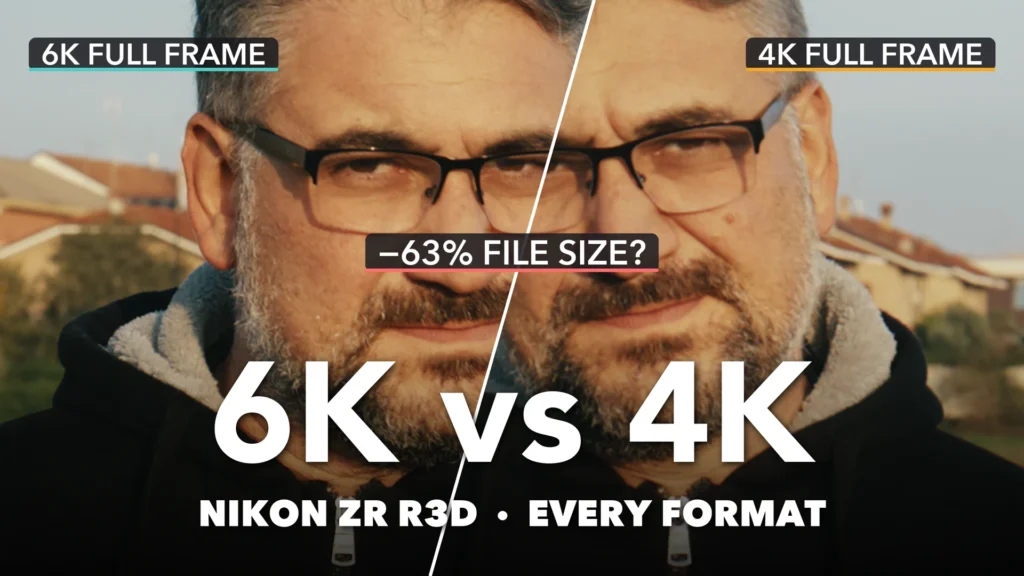
The Nikon ZR records R3D NE in three sensor modes (6K full frame, 4K full frame and 4K APS-C) and up to 120 frames per second. On paper they are all “RAW”, so does it matter which one you pick? I wanted a clear answer to the Nikon ZR R3D 6K vs 4K question, so I filmed myself and a brick building in every format, zoomed to 400% and measured every file. Then I went one step further and squeezed the same R3Ds with Blue Compressor to see how small they can get before you notice.
The setup
- Camera: Nikon ZR, R3D NE, ISO 800, 5880K
- Lens: Nikon 40mm f/2
- Subjects: me in a black hoodie (skin detail and shadow noise) and a brick building with balcony railings behind an autumn tree (moiré and aliasing)
- Post: DaVinci Resolve Studio 21, the same grade on every clip with the KUBIK PACIFIC LUT by KOLOR. No noise reduction, no sharpening. More on that grade in my KOLOR colour workflow article.
The seven formats
Here is every mode I tested, with bitrates measured from the card files:
| Format | Resolution | Frame rate | Mbps | GB per minute |
|---|---|---|---|---|
| 6K full frame | 6048 × 3402 | 25p | 1553 | 11.7 |
| 6K full frame | 6048 × 3402 | 50p | 3104 | 23.3 |
| 4K full frame | 4032 × 2268 | 25p | 693 | 5.2 |
| 4K full frame | 4032 × 2268 | 50p | 1383 | 10.4 |
| 4K APS-C (DX) | 3984 × 2240 | 25p | 677 | 5.1 |
| 4K APS-C (DX) | 3984 × 2240 | 50p | 1351 | 10.1 |
| 4K APS-C (DX) | 3984 × 2240 | 120p | 3235 | 24.3 |
One thing jumped out straight away: every mode stores about 3 bits per pixel. A 6K frame is always about 7.8 MB and a 4K frame about 3.4 MB, whatever the frame rate. So 50p and 120p cost you card space, not detail per frame.
Bricks and railings: moiré and aliasing
I expected the bricks and the vertical balcony bars to trip up at least one mode. They didn’t.
No moiré in any format
At 400% the brick pattern and the railings stay clean in 6K, 4K full frame and 4K APS-C, at every frame rate. No false colour, no shimmering pattern.
4K full frame is the soft one
What does change is sharpness. In 4K full frame the mortar lines between the bricks lose definition. 6K and 4K APS-C look almost the same.
Detail: the face at 400%
To compare fairly I matched the size of my face in every clip, so the APS-C crop is not getting an unfair zoom advantage.
6K full frame: the most detail
Beard, skin texture and the edges of the glasses are the crispest in 6K.
4K APS-C: almost 6K
This was the surprise. The 4K APS-C mode reads the sensor close to 1:1, and at 25p it looks almost as sharp as 6K, for less than half the file size.
4K full frame: the softest
Side by side with 6K or APS-C, 4K full frame is clearly softer. You keep the full-frame field of view, but you pay for it in detail.
Frame rate doesn’t change detail
25p, 50p and 120p look the same frame by frame. That matches the constant bits per pixel.
Shadow noise: the black hoodie
To see the noise floor I lifted the shadows by two stops in post. At ISO 800 the shadows are clean in every mode. 6K shows the finest grain. 4K full frame looks smoother only because it is softer, not because it is cleaner.
Part 2: Blue Compressor
RAW is heavy, so I recompressed the same R3D files with Blue Compressor at three levels. The output is still R3D, with the same name, timecode, frame count and RAW metadata as the original.
| Version | Bits per pixel | Space saved | What I saw at 400% |
|---|---|---|---|
| Original (in camera) | 3.0 | – | reference |
| Blue Compressor | 2.3 | 23% | no visible difference |
| Blue Compressor | 1.7 | 43% | no visible difference |
| Blue Compressor | 1.1 | 63% | only the finest shadow grain gets a touch smoother |
Colour and exposure stay identical, no blocks appear and the bricks don’t develop any new moiré. I also measured the fine detail: it drops by about 1% at 2.3 bpp, 2% at 1.7 bpp and 3 to 8% at 1.1 bpp, mostly in the deep shadows.
How much do you save?
6K full frame (GB per minute)
| Version | 25p | 50p | 1 TB card at 25p |
|---|---|---|---|
| Original 3.0 bpp | 11.7 | 23.3 | ≈ 1.4 h |
| Blue Compressor 2.3 bpp | 8.9 | 17.8 | ≈ 1.9 h |
| Blue Compressor 1.7 bpp | 6.6 | 13.2 | ≈ 2.5 h |
| Blue Compressor 1.1 bpp | 4.3 | 8.5 | ≈ 3.9 h |
4K full frame (GB per minute)
| Version | 25p | 50p | 1 TB card at 25p |
|---|---|---|---|
| Original 3.0 bpp | 5.2 | 10.4 | ≈ 3.2 h |
| Blue Compressor 2.3 bpp | 4.0 | 7.9 | ≈ 4.2 h |
| Blue Compressor 1.7 bpp | 3.0 | 5.9 | ≈ 5.6 h |
| Blue Compressor 1.1 bpp | 1.9 | 3.8 | ≈ 8.8 h |
4K APS-C (GB per minute)
| Version | 25p | 50p | 120p | 1 TB card at 25p |
|---|---|---|---|---|
| Original 3.0 bpp | 5.1 | 10.1 | 24.3 | ≈ 3.3 h |
| Blue Compressor 2.3 bpp | 3.9 | 7.8 | 18.6 | ≈ 4.3 h |
| Blue Compressor 1.7 bpp | 2.9 | 5.7 | 13.7 | ≈ 5.7 h |
| Blue Compressor 1.1 bpp | 1.9 | 3.7 | 8.9 | ≈ 8.8 h |
Can you delete the originals?
Because the compressed files keep the same name and timecode, you can relink them in DaVinci Resolve (Relink Clips) or Final Cut Pro (Relink Files) and the project opens again with your grade in place. The image changes only as much as you saw above. My advice: keep the originals until the job is delivered, check that every clip relinks, then archive the compressed versions. Recompression can’t be undone, and my test is one scene at ISO 800 in good light. Higher ISO or a heavier grade might show a bit more at 1.1 bpp.
My verdict and workflow
- 6K full frame for maximum detail.
- 4K APS-C is the sweet spot: almost 6K detail at 5.1 GB per minute.
- 4K full frame only when you need the full-frame field of view in 4K. It is the softest.
- 50p and 120p cost no quality per frame, only bigger files.
My workflow: shoot R3D NE, edit and grade on the originals, then archive with Blue Compressor at 1.7 bpp (43% smaller, no visible loss). I’d use 1.1 bpp only when space matters most.
Watch the full test
All the comparisons, split screens and tables are in the video:
Nikon ZR R3D: 6K vs 4K vs APS-C at 400% (+ Blue Compressor −63%)
[…] I tested every R3D format of the Nikon ZR in detail here: Nikon ZR R3D NE, every format tested. […]